My Environment: ESXi 5.5 u2 vCenter 5.5 u2 1 cluster in vCenter Lab in Ravello Cloud In some beauty day during day: Symptom: The type initializer for ‘VirtualInfrastructure.Utils.ClientsXml’ threw an exception In logs: “C:\Users\username\AppData\Local\VMware\vpx\viclient-0.log” i found only: Resolution: Restart server where is installed vSphere Client helped. I hope this informative for you. Thanks for Reading!. Be […]
VMware

My Environment: ESXi 5.5 u2 vCenter 5.5 u2 only 1 VSAN datastore in cluster 2 cluster in vCenter Symptoms: Cannot perform snapshot consolidation in VMware ESXi 5.5 Performing a snapshot consolidation in ESXi 5.5 fails. In logs on this VM (vmware.log) we found: After fast troubleshooting with VMware engineer we receive summary: “I tracked down […]

Symptoms: vROPS login page is not loading – blank page after use command: service vmware-vcops status during generate results command is hanging after use command vmware-vcops restart process is hanging No activity on Network performance chart and small activity on CPU chart Resolution: Restart vROPS Appliance: For your information. Service restart process should […]

During login to vSphere Web Client 5.5 we have this situation ( only vmware logo or initializing info… ): In vCenter Appliance portal: https://vcenter:5480

QuickTip: Installation error during vCenter 5.5 Simple Install setup on fresh Windows Server 2008 R2

Symptom: “There is a problem with This Windows Installer package,A DLL required for install to complete could not be run….” Resolution: Install Visual C++ Redistributable package from “DVD location”:\Single Sign-On\prerequisites\vcredist_x64.exe

I tested this on: DELL PowerEdge R730 DELL PERC H730 Mini (Embedded) iDRAC 8 – Integrated Dell Remote Access Controller Version 2.15.10.10 (Build 08) ESXi 5.5 u3 Part 1 – Gathering naa. numbers related from physical disks from ESXi console and iDRAC console: On host where we use VSAN namespace: On host without VSAN namespace Commands […]
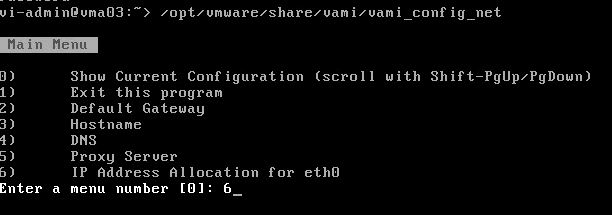
Sometimes when you want change something in configuration after first boot you can using special console: Command to use: /opt/vmware/share/vami/vami_config_net
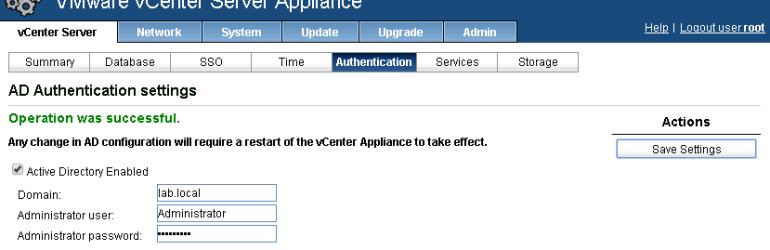
If during adding vCenter Appliance 5.5 server to domain you received error: Error: Invalid hostname. FQDN is required for joining a domain. Check if you dont have hostname without domain name: Fix it and save settings: Try again add to domain: Done.