Latest Articles
QuickTip: Keyboard Shortcuts of VMware vSphere Web Client
Keyboard Combination Action Ctrl+Alt+Home OR Ctrl+Alt+1 Home Screen Ctrl+Alt+2 Virtual Infrastructure Inventory Ctrl+Alt+3 Hosts and Clusters Inventory Ctrl+Alt+4 VMs and Templates Inventory Ctrl+Alt+5 Datastores and Datastore Clusters Inventory Ctrl+Alt+6 Networking Inventory Ctrl+Alt+s Inventory Search I hope this is informative for you. Thanks for Reading!. Be Social and share it in social media, if you feel […]

QuickFix: The type initializer for ‘VirtualInfrastructure.Utils.ClientsXml’ threw an exception
My Environment: ESXi 5.5 u2 vCenter 5.5 u2 1 cluster in vCenter Lab in Ravello Cloud In some beauty day during day: Symptom: The type initializer for ‘VirtualInfrastructure.Utils.ClientsXml’ threw an exception In logs: “C:\Users\username\AppData\Local\VMware\vpx\viclient-0.log” i found only: Resolution: Restart server where is installed vSphere Client helped. I hope this informative for you. Thanks for Reading!. Be […]

QuickTask: How check grace period in Windows Server
Sometimes we need to know how long will be working grace period for specific server: You can take this information from: warning after login to server: or use this command: I hope this informative for you. Thanks for Reading!. Be Social and share it in social media, if you feel worth sharing it. Please comment […]

QuickFix: Virtual machine Consolidation is needed – ESXi 5.5
My Environment: ESXi 5.5 u2 vCenter 5.5 u2 only 1 VSAN datastore in cluster 2 cluster in vCenter Symptoms: Cannot perform snapshot consolidation in VMware ESXi 5.5 Performing a snapshot consolidation in ESXi 5.5 fails. In logs on this VM (vmware.log) we found: After fast troubleshooting with VMware engineer we receive summary: “I tracked down […]

QuickFix: vROPS 6.0 services not working
Symptoms: vROPS login page is not loading – blank page after use command: service vmware-vcops status during generate results command is hanging after use command vmware-vcops restart process is hanging No activity on Network performance chart and small activity on CPU chart Resolution: Restart vROPS Appliance: For your information. Service restart process should […]

QuickFix: vSphere Web Client 5.5 doesn’t load after login
During login to vSphere Web Client 5.5 we have this situation ( only vmware logo or initializing info… ): In vCenter Appliance portal: https://vcenter:5480

QuickTip: Mount network share and open specific folder in Windows Explorer
Example: net use s: \\server\share$ /USER:MyUser@MyDomain.net MyPassword c:\windows\EXPLORER.EXE /n, /e, S:\_public\folder
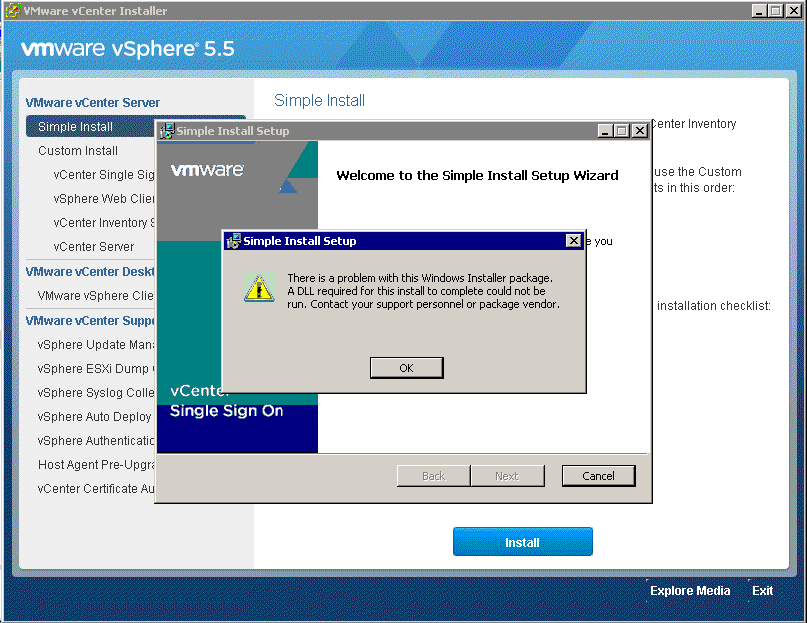
QuickTip: Installation error during vCenter 5.5 Simple Install setup on fresh Windows Server 2008 R2
Symptom: “There is a problem with This Windows Installer package,A DLL required for install to complete could not be run….” Resolution: Install Visual C++ Redistributable package from “DVD location”:\Single Sign-On\prerequisites\vcredist_x64.exe